How a UAE E-Invoice Actually Travels: The Five-Corner Model in Plain English
How a UAE e-invoice moves from your ERP to your customer and the FTA, what your ASP does, what an e-invoice contains, and what to do when a customer isn't ready.
From go-live, emailing a PDF doesn’t count as issuing an invoice. The invoice has to travel as structured data through two service providers, with the tax data reported to the FTA on the way. Here’s how that works, based on the Ministry of Finance’s Electronic Invoicing Guidelines v2.0.
The five corners
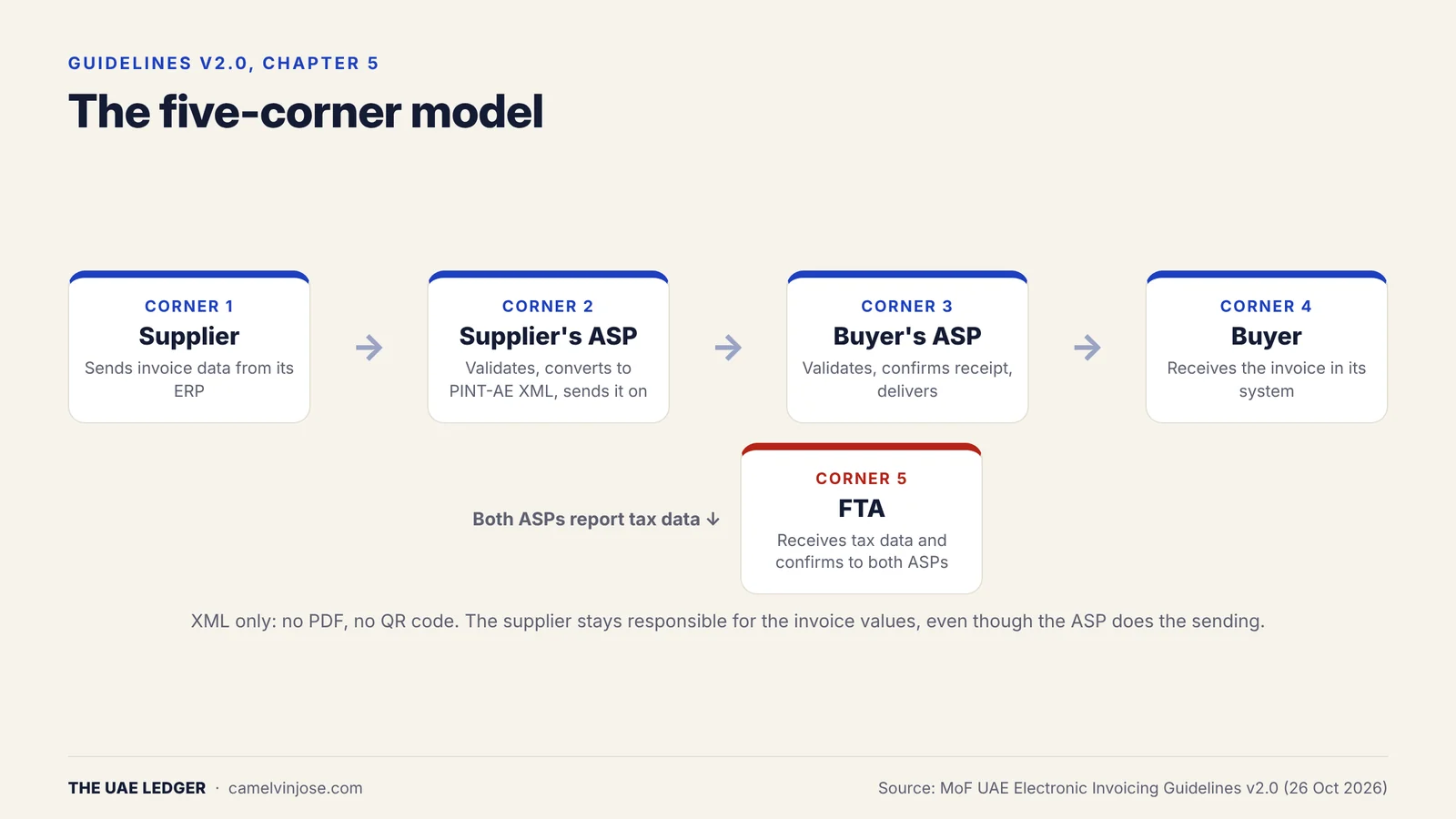
- You (the supplier) send the invoice data from your ERP or billing system to your ASP, in a format you’ve agreed with them.
- Your ASP validates the data and converts it into the UAE standard, PINT-AE XML. It also generates the invoice’s unique ID (UUID).
- Your ASP sends the invoice over the Peppol network to your customer’s ASP, and at the same time reports the tax data to the FTA.
- Your customer’s ASP validates the invoice, confirms receipt and delivers it to your customer.
- The FTA confirms the tax data to both ASPs, and each ASP passes the confirmation back to its client.
If the invoice fails validation at your customer’s ASP, that ASP tells your ASP and the FTA. The failure comes back to you to fix.
Two things to take from this:
- You stay responsible. The ASP does the sending, but the guidelines are clear that the obligation remains with the supplier. You calculate every value on the invoice. A wrong VAT figure is your error, not your ASP’s.
- There’s no PDF and no QR code. The legal e-invoice is the XML. You can still send a PDF copy for convenience, but it doesn’t replace the e-invoice.
Your Peppol address
Every business on the system gets a Participant Identifier: 0235 followed by its 10-digit TIN, the first 10 digits of its TRN. That’s the address invoices are sent to. Each member of a VAT group has its own TIN and identifier, based on its own TRN, not the group representative’s.
What an e-invoice has to contain
The Ministry’s mandatory fields list sets out 51 mandatory fields under PINT-AE, plus conditional ones. The data falls into a few groups:
- Header: invoice number, issue date, invoice type code, currency, due date, UUID.
- Seller and buyer: name, TRN (or TIN if not VAT-registered), legal registration details and issuing authority, address, electronic address.
- Lines: item name, quantity, unit of measure, unit price, discounts and charges, VAT category, rate and amount, and whether it’s goods or services.
- Totals and VAT breakdown: net, VAT and gross totals, amounts already paid, amount payable, and VAT by category.
Some points from the clarifications in the guidelines (v2.1):
- A VAT-registered seller puts its 15-digit TRN in the VAT number field. A seller that isn’t VAT-registered uses its 10-digit TIN in a different field. A Corporate Tax TRN must never go in the VAT field.
- Advance payments: issue a tax invoice when the advance is received. The final invoice covers only the balance and refers back to the advance invoice.
- Credit notes: one credit note can cover several invoices, and it can be partial. A negative invoice must be issued as a credit note.
- Invoice type code 480 is for transactions outside the scope of UAE VAT, and for invoices made up entirely of VAT-exempt or non-VAT supplies. Code 380 is for taxable supplies.
- HSN codes are optional for now. The Ministry will announce when they become mandatory.
- You can’t add your own fields to PINT-AE.
The practical point: most ERPs don’t capture all of this today, especially buyer legal registration details. That data gap is usually the biggest piece of work in a project, not the connection to the ASP.
When your customer isn’t ready
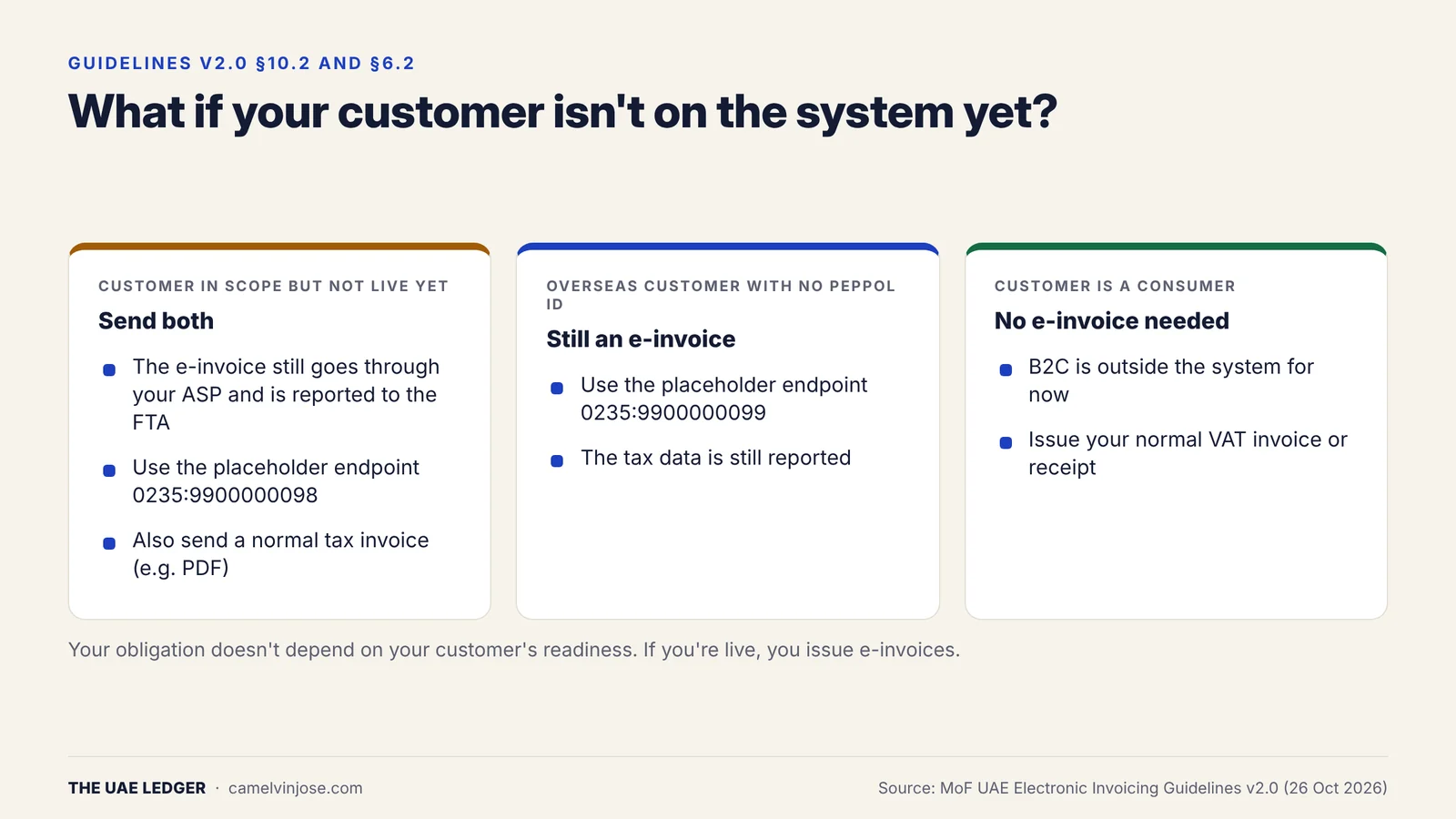
Phases go live at different times, so you’ll often be live before some customers are. Your obligation doesn’t depend on theirs.
- The customer is in scope but not live yet: you still issue the e-invoice through your ASP, using the placeholder endpoint 0235:9900000098, and the tax data is reported. You also send a normal tax invoice, such as a PDF, so they can recover input VAT.
- An overseas customer with no Peppol ID: you still issue an e-invoice, using the placeholder endpoint 0235:9900000099.
- A consumer: no e-invoice. B2C is outside the system for now.
Timing
The decisions require e-invoices and credit notes to be issued and transmitted within 14 business days of the transaction. VAT timing rules still apply alongside that. Ministerial Decision No. 197 of 2026 has the detail.
What to do now
- Map your invoice data against the mandatory fields, and fix the gaps at source in your customer master.
- Collect customers’ TRNs and TINs now, rather than at go-live.
- Agree a rejection process with your ASP: who sees the failure, who fixes it, and how fast.
- Keep sending PDF tax invoices to customers who aren’t live yet.
Sources: UAE Electronic Invoicing Guidelines v2.1 (Ministry of Finance, 25 November 2026), Chapter 5, Sections 2, 3, 6, 10 and 12, and Appendix 6; UAE Electronic Invoice Mandatory Fields v1.0.
Common questions
Is a PDF still a valid invoice under UAE e-invoicing?
No. The legal e-invoice is the PINT-AE XML sent through your ASP. A PDF can go alongside it as a copy, but it doesn't replace it.
What is my Peppol Participant Identifier?
0235 followed by your 10-digit TIN, which is the first 10 digits of your TRN.
What if my customer isn't live on e-invoicing yet?
You still issue the e-invoice through your ASP to the placeholder endpoint 0235:9900000098, and also send a normal tax invoice such as a PDF.
This article is general information and may be out of date. Check the latest guidance from the Federal Tax Authority before acting.